Buying smart on Vinted: finding gems and grabbing great deals!
Shopping on Vinted means getting seriously great deals!
Vinted is the best peer-to-peer platform for buying and selling secondhand clothing.
With more than 2 million listings published every day, Vinted is a goldmine for hunting down bargains.
You can find brand-new items at lower prices, sold-out pieces, or items from old collections, all from the comfort of your sofa!
In this article, we'll cover every tip and trick for buying smart on Vinted.
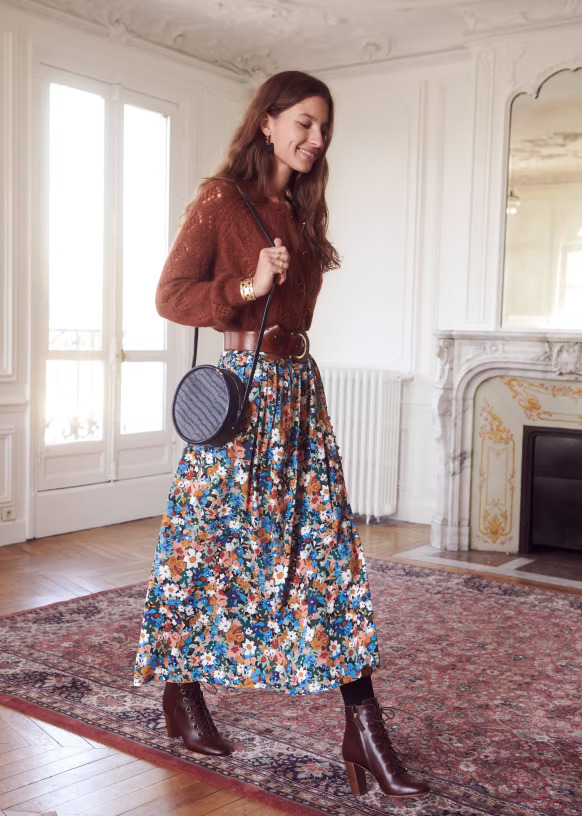
The Sézane Nelly Fall Flowers skirt, highly sought after on Vinted
Finding the item of your dreams
I'd say there are two ways to find an item on Vinted.
You might not know exactly what you're looking for, in which case you can do a multi-brand search by entering your size along with generic keywords like vintage, a colour, and a product category.
Or you know exactly what you want. In that case, don't hesitate to use advanced search filters and Souk.
I also wrote a dedicated article on Vinted Alerts covering everything you need to know about setting up alerts on Vinted.
One of Vinted's great strengths is its wide range of selection filters to help you find the exact item you're looking for.
You can filter by:
- Categories: clothing, accessories, shoes, etc.
- Brands: Nike, Sézane, etc.
- Size: S, M, L, 36, 37, etc.
- Colour: black, white, etc.
- Condition: new, used, etc.
- Price: from £1 to £8,000!
- Swap
Vinted Categories
The available categories are very granular, so be careful not to pick the wrong one; choose a broader parent category if in doubt.
Personally, I'm a big fan of the Plain T-shirts category, for example.
Here are the top-level categories on Vinted:
- Women
- Clothing
- Shoes
- Bags
- Accessories
- Beauty
- Men
- Clothing
- Shoes
- Accessories
- Grooming
- Kids
- Girls
- Boys
- Games & Toys
- Baby Care
- Pushchairs
- Ride-ons, walkers & rockers
- High chairs & Car seats
- Kids' furniture
- School supplies
- Home
- Textiles
- Decoration
- Tableware
- Entertainment
- Video games & consoles
- Games & puzzles
- Music & video
- Books
- Pets
- Dogs
- Cats
- Small animals
- Fish
- Birds
- Reptiles
Vinted Brands
You can filter by brand on Vinted.
I'd recommend using this filter rather than typing the brand name into the search bar, as it's far more precise.
There are over 15,000 brands available through this filter.
If it's a lesser-known brand, it may not appear in the filter; in that case, just add it to the search bar instead.
If you're looking for inspiration, check out the article on the most searched-for brands on Vinted.
Vinted Sizes
Vinted lets you filter by size across several categories: Clothing, Shoes, Rings, Bras, and others.
Size selection is exclusive to one category at a time. So if you choose a clothing size, it applies only to clothing.
Sometimes you might find the same item listed under both Women and Men.
In that case, don't hesitate to select both corresponding sizes to broaden your search.
On the flip side, sellers sometimes pick the wrong size, which can place an item in a different category than expected.
Vinted lets you pre-select your size and shoe size so they're automatically applied to every search.
The app also lets you follow your favourite brands.
To set these preferences on the mobile app, go to Profile > Personalisation.
On the website, click your profile photo and then Personalisation.
Always try to buy an item whose measurements you know or that you've tried on before.
It's not unusual to be in for a nasty surprise even when you order your usual size.
Vinted Colours
Vinted even lets you filter items by colour.
Colours are suggested to sellers when they create their listing.
Each item has two colours assigned: a primary colour and a secondary colour.
Here are the available colours: Black, Grey, White, Cream, Beige, Apricot, Orange, Red, Burgundy, Pink, Rose, Purple, Lilac, Light blue, Blue, Navy, Turquoise, Mint, Green, Dark green, Khaki, Brown, Mustard, Yellow, Silver, Gold, Multicolour
Vinted Keywords
Like any text-based search engine, choosing the right keywords to type into Vinted's search bar can help you uncover some real hidden gems.
One trick is to use translations from other languages to find rarer or cheaper items. Try searching in English, Spanish, Italian, or Portuguese for what you're looking for.
For a "sleeveless jumper", search "sleeveless sweater" or "gilet senza maniche".
When using adjectives, stick to the singular form without plurals or feminine variants to cast a wider net. For "platform soles", it's better to type "platform sole".
You can also diversify your results by searching for synonyms of what you're after. For a "zip-neck jumper", you can also try "half-zip jumper".
Try to account for typos made by sellers. Sellers can misspell words and some typos aren't caught by Vinted's search engine.
For example, search both "trucker jacket" and "truker jacket".
Get creative and you'll find that rare gem at a bargain price!
Sorting results
Once you've set your search filters, you have several sorting options available.
- Relevance
Let Vinted's algorithm decide what to show you. With this option, Vinted may also surface boosted listings. - Price: lowest first
Great for finding the cheapest items and grabbing the best deals. - Price: highest first
Use this to see the priciest items matching your criteria. - Most recent
My personal favourite! Use this to see the latest listings. It also has the benefit of filtering out boosted listings.
Searching by location on Vinted
You can do a location-based search by city on Vinted.
Simply type the city name into the search bar!
This is really handy if you want to arrange a local pick-up, particularly for bulky items like pushchairs, or for items that might be counterfeits.
Tip: arranging a local pick-up also lets you avoid the buyer protection fees!
Using email alerts and notifications for Vinted
Many listings are only available for a few hours, sometimes just a few minutes after going live.
If an item is in high demand or priced attractively, you might never even see it if you only check the search results once a day.
I wrote a dedicated article on Vinted Alerts. In that post, I cover all the different alert options available on Vinted and explain how to use them.
I built a small mobile app that lets you receive an email alert or a push notification the moment a listing matching your search criteria goes live.
That way, you'll never miss a great deal!
To download the app, head over to souk.to.
Saving your Vinted searches
On the search results screen, you can save a search by clicking the small bookmark ribbon.
This feature lets you come back to your search later.
It's really useful if you've set up a search with lots of filters and don't want to re-enter all those parameters every time.
To find a saved search, click the search bar and scroll all the way to the bottom: that's where they're hidden!
You'll also find your recent searches there.
Tip: if there are new listings matching a past or saved search, a small "+1" indicator shows you how many new items are available.
You won't be notified when new items appear in a saved search.
If you want to be alerted about new listings matching a search, I'd recommend using Souk.
Adding an item to your favourites
You can add an item to your favourites by clicking the small heart on a listing.
You'll be notified if the price drops on that item.
It also lets you find the item again in your favourites list.
To do this, click the heart icon in the favourites menu on either the website or the app.
You'll only receive a notification when the item is sold, which is pretty frustrating and not very useful!
Analysing a Vinted listing
Vinted Photos
Sellers can add up to 20 photos to a listing.
Some sellers might not mention defects in the description but still show them in the photos.
Make sure to look through every photo carefully to avoid any nasty surprises after buying.
Check that there are no stains, snags, scratches, signs of wear, flaws, or that the item isn't damaged or coming apart at the seams.
It's also important to check that the photos were actually taken by the seller themselves.
Avoiding scams
Unfortunately, given its popularity, there are plenty of scams on Vinted.
There are many recently created fake accounts that will sell you counterfeits by showing photos of genuine items.
To avoid being caught out, here's how I assess whether a seller is trustworthy.
First, look at the number of reviews on the seller's profile. If they have more than 100 five-star reviews, they're likely legitimate.
Be cautious with sellers who have fewer than 10 five-star reviews.
Some sellers don't hesitate to carry out fake transactions to rack up a few positive reviews before selling counterfeits.
So I check whether the transactions behind those few positive reviews are recent. If all the sales happened within the last month, I stay on my guard.
The next step is to message the seller. It's a gut-feel thing: from the way they write, you'll get a sense of whether you feel comfortable trusting them.
I've had sellers swear an item was genuine, only to be bitterly disappointed when it arrived.
The Seller's Profile
Information available on a seller's profile includes their photo, description, city, last login date, followers, and of course their ratings.
Five-star reviews are very common on Vinted, so if a seller's average is below 5, take a look at their reviews to understand what happened.
If the seller is nearby, you can ask for a local pick-up. This can be handy for expensive or disputed purchases.
If their last login was more than a week ago, the seller might be unreachable and could take a long time to send your item, or not send it at all!
Gauging interest in a Vinted listing
On the product page, you can assess how much interest other Vinted users have in an item through several indicators.
Number of views: the number of unique Vinted users who have visited the product page.
Once an item has over 10 views, it's a popular listing.
Number of favourites: the number of unique Vinted users who have added the listing to their favourites.
Once an item has 2–3 favourites, you might want to act quickly if you don't want to miss out.
Number of interested buyers: the number of unique Vinted users who have made an offer to the seller.
As soon as there's 1 offer on an item, be careful: a negotiation is already underway!
Contacting the seller
Don't hesitate to ask the seller for more details about the item.
You can ask for measurements, a photo of someone wearing it, or a closer photo of a mentioned defect.
For used trainers, for example, I often ask to see photos of the soles.
It's also a good way to gauge whether the seller is responsive and willing to make a sale.
You might even be able to use the opportunity to negotiate a fairer price.
Negotiating and making an offer on Vinted
Don't be afraid to negotiate on Vinted.
But only when the item isn't likely to sell quickly.
There's a lot of traffic on the site, and things go fast!
If a listing has been up for more than a week with no offers, you can try negotiating.
I've saved several hundred pounds that way.
I once got a Balenciaga bag down from £420 to £290 with a fairly bold offer.
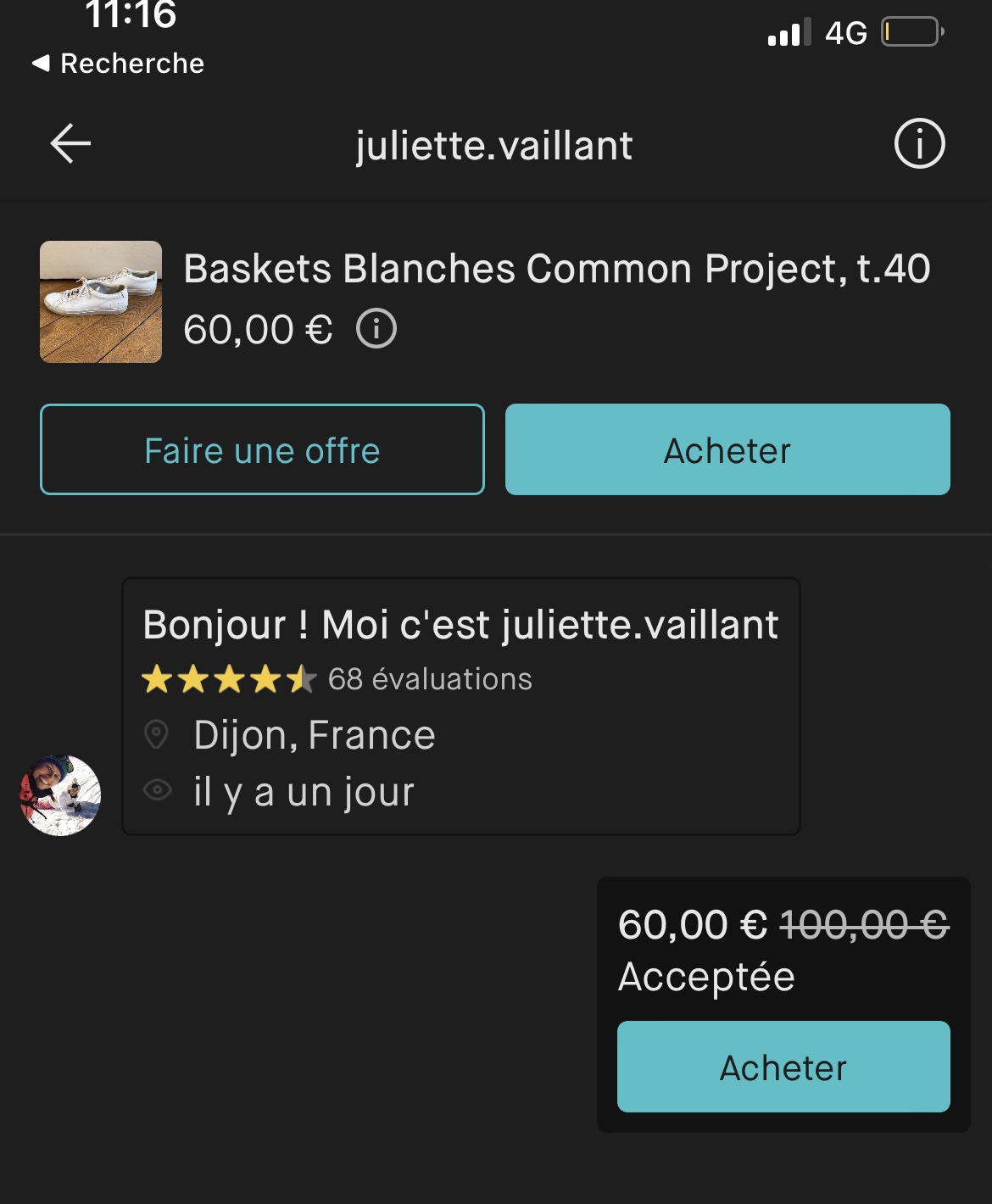
Here, I never thought she'd accept such a low offer!
You can make an offer up to 40% below the listed price.
For example, if an item is priced at £100, the lowest offer you can submit is £60.
As a buyer, you're not committed to the offer. Even if it's accepted, you can still choose whether or not to confirm the transaction.
The seller can decline your offer but also make a counter-offer. It's not unusual to reach a middle ground after a few rounds of back-and-forth.
Tip: during the sales, don't hesitate to negotiate a little harder. Vinted users tend to spend less on the platform during that time! Plus, sellers also need to free up cash to buy their own favourite sale items in shops.
Saving with Vinted Bundles
A seller can let you create bundles to save on shipping costs.
Sometimes the seller will offer a discount ranging from -5% to -50% on the bundle price, depending on how many items you buy.
I've never used this feature myself.
Tip: if you're buying a fairly expensive item (say a bag at £200), you can combine it with a cheaper item at, say, £10. If the seller is offering -25% on a bundle of 2 items, the total would come to £157.50. Unfortunately, I've never managed to pull this off in practice :(
Swapping
I've never done a swap, so I can't really help you much on this one.
I imagine the other person would need to live nearby for it to work.
Vinted Fees
For every transaction on Vinted, the buyer pays a fixed fee of £0.70 + 5% of the item price, excluding shipping costs.
For example, on a £5 item, the fees would be £0.70 + 5% × £5 = £0.70 + £0.25 = £0.95.
And then you'll need to add shipping costs on top of that!
Here's a quick example table of fee calculations at different price points:
| Item base price | Vinted fees | Total price |
|---|---|---|
| £1 | £0.75 | £1.75 |
| £10 | £1.20 | £11.20 |
| £50 | £3.20 | £53.20 |
| £100 | £5.70 | £105.70 |
| £200 | £10.70 | £210.70 |
| £1,000 | £50.70 | £1,050.70 |
For items priced above £1,000, it might be worth arranging a local pick-up to avoid the fees altogether.
Bear in mind that if you transact outside the Vinted platform, you won't be covered by buyer protection.
For comparison, eBay charges fees of around 10%, but these are charged to the seller rather than the buyer.
There are no fees whatsoever for sellers on Vinted.
Payment methods on Vinted
Vinted only accepts payment by debit or credit card. PayPal is not supported.
However, if you've made sales on the platform, you can pay using your Vinted Wallet, which holds the earnings from your previous transactions.
The Vinted Wallet works a bit like store credit that you can put towards future purchases.
Delivery services for Vinted in the UK
Vinted offers several delivery services depending on your region.
The seller chooses which delivery services they want to offer you.
If you're using a collection point service, I'd recommend checking which pick-up points are available near you before confirming your purchase.
Mondial Relay typically delivers within 3 to 5 days once the seller has dropped off the parcel.
Once your parcel arrives at the collection point, you'll have 14 days to pick it up; otherwise it will be returned to the seller.
Seller dispatch on Vinted
Once you've completed your purchase, all that's left to do is wait for the seller to ship the parcel.
Sellers typically dispatch within 24 to 48 hours of the purchase.
If you haven't heard anything after 3 days, don't hesitate to send them a message.
They might be on holiday or otherwise unavailable.
Buying a Vinted item from another country
Vinted now lets you buy items from different countries depending on the delivery services available.
You can buy items from platforms in France, Belgium, Luxembourg, the Netherlands, Italy, Spain, and Portugal.
Via Mondial Relay, you can buy items from France, Belgium, Luxembourg, the Netherlands, Spain, and Portugal. If you can see the option isn't available, you can ask the seller to enable it.
Via UPS Access Point, you can buy items from France, Belgium, the Netherlands, Italy, and Spain.
Here is a list of delivery services by country, with the mandatory options shown in italics:
France: UPS Access Point, Colissimo, Shop2Shop by Chronopost, Relais Colis, Mondial Relay
Belgium: UPS Access Point, BPost, BPost International, Homerr, DHL Home delivery, Mondial Relay
Luxembourg: Mondial Relay
Netherlands: PostNL, UPS Access Point, DPD Pickup, DHL Home delivery, Homerr, DHL ServicePoint, Mondial Relay
Italy: UPS Access Point, Poste Italiane - Punto di Ritiro, InPost Locker/Point, BRT-fermopoint
Spain: Correos (home), Correos (post office), Correos CityPaq, UPS Access Point, DHL Home delivery, SEUR Shop2Shop, SEUR Shop2Home, Envialia Home2Home, Mondial Relay
Portugal: DPD Shop2Home, DPD Pickup, CTT Expresso, Mondial Relay
Germany: DHL Paket, Deutsche Post, UPS Access Point, DPD Shop2Shop, DPD CLASSIC, DHL Päckchen (uninsured), Hermes Haustür-Zustellung, GLS, Hermes PaketShop, Deutsche Post uninsured
Austria: UPS Access Point, GLS
I wasn't able to check the services available for other countries: USA, Czech Republic, Lithuania, Slovakia, Poland.
You won't be able to buy items from the USA, Canada, Germany, Austria, Czech Republic, Lithuania, Slovakia, or Poland directly.
Souk will still alert you to listings available on those platforms.
If you want to buy from them, you'll need to use international forwarding or "proxy" services.
One example is ColisExpat.
The costs of these services can be significant, as you're essentially paying for a second delivery on top of the service provider's fees.
Vinted Disputes
I've had several disputes on Vinted as a buyer.
I was trying to buy AirPods Pro at a good price through Souk, but even though the seller assured me they were genuine, I kept receiving counterfeits.
I managed to prove they weren't legitimate fairly easily. I submitted photos referencing the serial numbers as evidence. Vinted always sided with me and refunded me within a few days.
I imagine that's not always the case.
As for the counterfeit item itself, sometimes the seller asked me to return it; once, they didn't even dare ask.
Stay on your guard!
Following a seller
Vinted has a follow system built into the platform.
You can follow other members from their profile, and they can do the same in return.
By following a seller, you'll be notified whenever they add new listings.
This feature is really handy if you find a Vintie who has the same taste and the same measurements as you!
How to search for a seller on Vinted
You can search for a seller on Vinted using the search bar.
On the website, click "Items" to switch the search to "Members", then type the username of the seller you're looking for.
On the app, tap the search bar and then tap "Members" below the field to filter results accordingly.
Finding your past purchases via Vinted purchase history
It's not possible to view your purchase history from the Vinted website, whether you're on a PC/Mac or a mobile browser.
You'll need to use the mobile app: go to the "Profile" tab and then "My sales and purchases".
From there, you'll have access to your full Vinted buying and selling history.
Alternatives to Vinted
The most popular alternatives to Vinted that deliver in the UK are:
- eBay
- Depop
- Vestiaire Collective
Vestiaire Collective specialises in buying and selling luxury secondhand items, with protection against counterfeits. - The RealReal
- Grailed
- StockX
- Facebook Marketplace
- Shpock
- Gumtree
- ASOS Marketplace
- Thredup (USA)
- Poshmark (USA)
- Mercari (USA)
There are also brand-run initiatives such as:
Conclusion
That's it! Those are all the tips and tricks I've picked up from using Vinted over the past few years.
If you have any other tips to share, feel free to send them my way on social media: Facebook and Twitter.